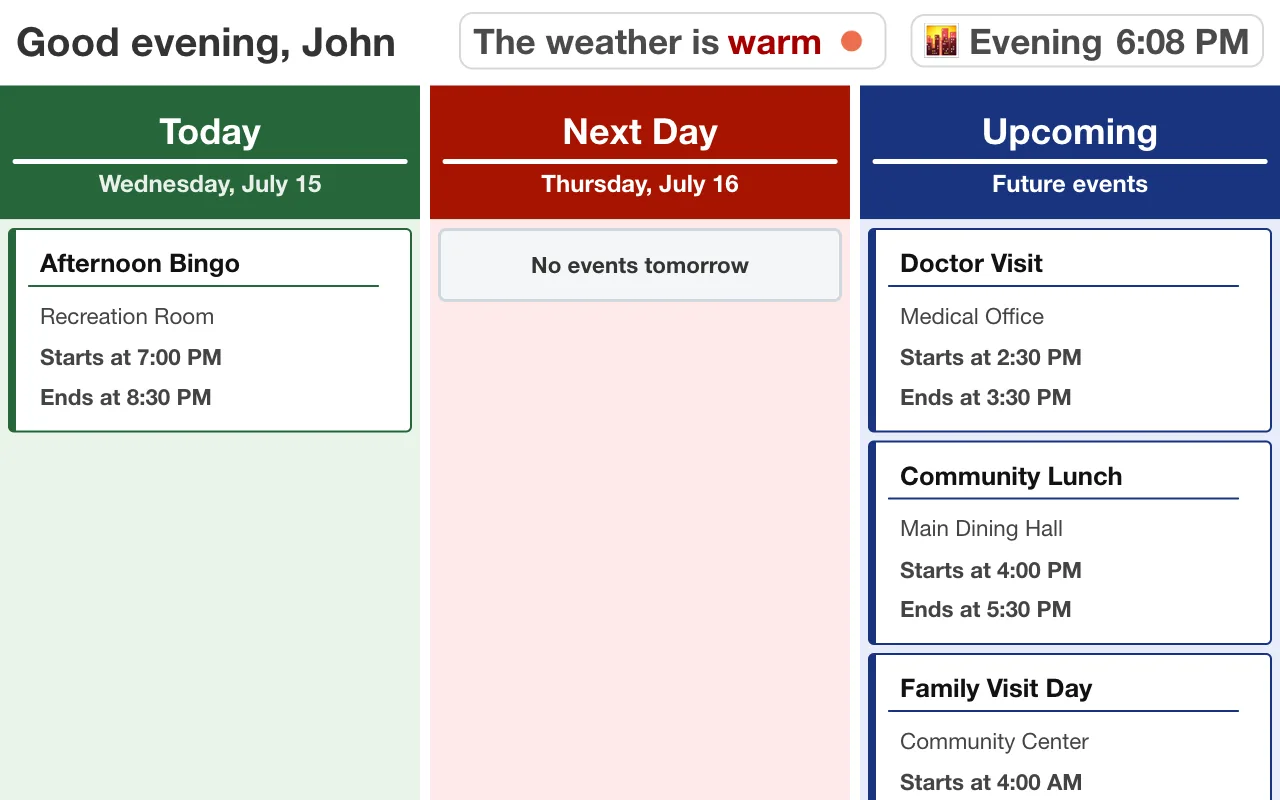
MindUp puts a simple, always-current calendar in your parent's room — and gives you a portal to add to it, so "Sarah visits Saturday at 2" is right there on their screen.
Phones get lost, silenced, and forgotten. Paper calendars stop being right the day after they're printed. What works is a display that's always on, always current, and always in the same place — no buttons to press, nothing to charge, nothing to learn.
That's what the MindUp tablet is: a calm, readable screen mounted in your loved one's room showing today's plan in large, high-contrast text.
Access is secure and controlled by the community — you request access, staff approve it, and only approved family members can see or change anything.
Several family members can share access to the same resident — siblings coordinating visits see each other's events, so Saturday doesn't get double-booked.
Does my parent have to do anything? Nothing at all. The tablet is a display — no taps, no charging, no passwords. They just look up and see their day.
Can I change how much is on the screen? Yes. If a full calendar has become overwhelming, the display can be simplified — down to just today, or just your note and photo. See how the display can be simplified.
Who can see what I post? Your note and photo appear only on your loved one's screen, and only approved family members and community staff can view their calendar.
Does it cost the family anything? MindUp is provided by the community, not sold to families.
The calendar is the backbone, but the small touches are what stick:
None of this requires your parent to do anything. That's the point: you do the typing, they get the day.
MindUp is installed by senior living communities, not individual families. If you'd like this for your parent, the fastest path is telling their activity director about us — or send us their community's name and we'll reach out. Communities can start with a free pilot.