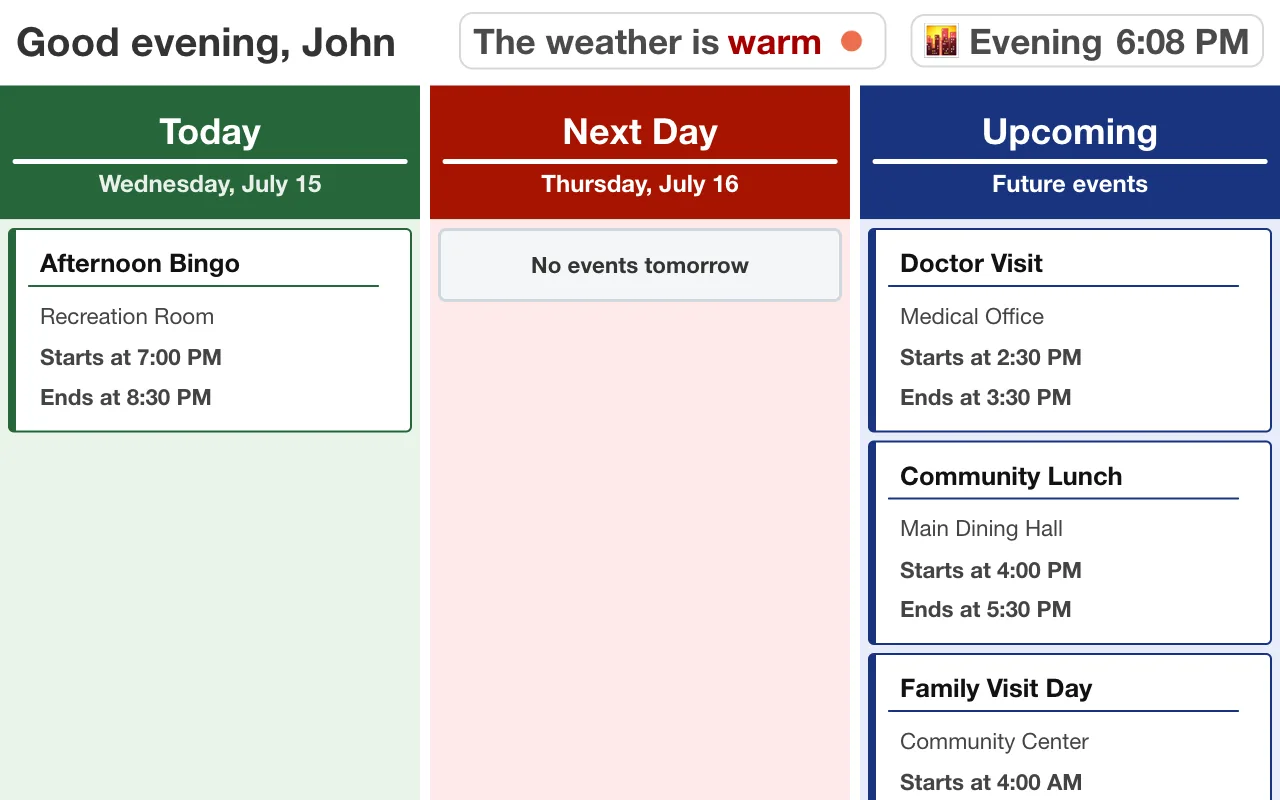
Most activity calendars live on paper by the elevator. MindUp puts yours on a tablet in every resident's room — updated the moment your team changes it.
Your activity team already does the hard part. Every month they plan a full slate of programs, format a calendar, print it, and post it — by the elevator, in the dining room, maybe slipped under doors. And then reality happens: the musician reschedules, bingo moves to the sunroom, a trip gets added. The printed calendar is now wrong everywhere it hangs, and the residents who most need the schedule are the least likely to walk to the lobby to check it.
The result shows up in your engagement numbers. Residents skip programs they would have loved because they didn't know, staff answer "what's happening today?" dozens of times a shift, and families ask why mom keeps missing the events they saw in the newsletter.
MindUp closes that last-mile gap: the calendar your team already builds, delivered to a screen in every resident's room, always current.
Each resident's display shows their group's activities plus their personal events — a doctor's appointment, a granddaughter's visit — layered on the same screen. Staff can also choose from several display styles per resident, from a full monthly calendar to a simplified today-only view.
| Paper calendar | Lobby TV slideshow | MindUp room tablets | |
|---|---|---|---|
| Stays current | Wrong after the first change | Yes, if someone updates the slides | Yes — real time, automatically |
| Reaches every resident | Only those who walk to it | Only those in common areas | Yes — it's in their room |
| Per-resident schedule | No | No | Yes — personal events + group activities |
| Family participation | No | No | Yes — secure family portal |
| Readable with low vision | Depends on the printer | From across the room? Rarely | Large type, high contrast, by design |
| Staff effort per change | Reprint and re-post | Edit slides | Type it once |
Role-based access. Activity staff manage the calendar; admins manage devices and users; nobody needs IT. Owners, managers, and members each see the tools appropriate to their role.
Your brand on every screen. Facility logo, colors, and announcements — the tablets read as part of your community, not a vendor's gadget.
Tablets that behave like appliances. Screens ride out Wi-Fi outages and keep displaying the schedule they have, then reconnect and refresh on their own. There's nothing for a resident to press and nothing for your staff to troubleshoot room by room.
Readable by design. The display views use large type, strong contrast, and a simple Today / Next Day / Upcoming structure — built for aging eyes, not shrunk-down office software.
Every resident's family can request access to a secure family portal: they see the same schedule the tablet shows, add personal events, and post a note and photo directly to their loved one's screen. Staff approve every access request, so nothing appears in a resident's room without your community's say-so.
Connected families are your best retention and your best tour story. "Your daughter can put her Sunday visit on mom's screen from her phone in Seattle" lands differently than a features list.
Do we have to re-enter our existing calendar? You enter it once in the portal — and recurring events mean the monthly repeats build themselves. Most communities are current within an afternoon.
What if our Wi-Fi is spotty? Tablets keep showing the schedule they already have and recover automatically when the network returns. See the FAQ for details.
Can a resident get a simpler screen? Yes — display views can be simplified per resident, down to a today-only view with a family note and photo. There's a whole page on how the resident display works.
What does it cost? We're running a free pilot for a limited number of communities right now — the fastest way to find out if it fits is to try it in a wing.